
Build a Real Computer from Scratch
No screens. No simulators. Real chips. Real wires. Real computer.
A 5-session hands-on workshop where you build a working 8-bit computer on a breadboard using the same processor that powered the Apple II, the Commodore 64, and the Nintendo. You start with nothing. By the end, it runs programs.
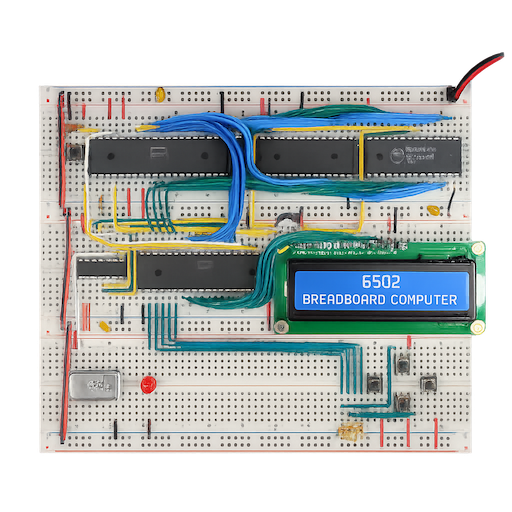
AI-generated image for illustration purposes only.
Who Is This For?
No prior electronics or programming experience required. We start from zero.
Curious Teens
Ages 12+ who want to know how computers actually work — not just use them.
Adult-Child Teams
Build something real together. Two people share one project.
Makers & Tinkerers
If you love taking things apart, you'll love building one from scratch.
The Simply Curious
Ever wondered what's actually inside a computer? Come find out with your hands.
The 5 Sessions
Five evenings, one legendary computer. Here's the journey from blank breadboard to running your own code.
Wire Up the Clock & CPU
The CPU needs a heartbeat. Build the clock, wire the 6502, and force it to execute its first instruction — watch the address bus count up. First proof of life.
Execute Real Code from ROM
Burn a program onto an EEPROM chip and add address decoding so chips don't collide. Add an output port and light up LEDs straight from your code.
Add Memory & Input & Serial
Give the CPU read/write RAM for variables, a stack, and subroutines. Then add an input port and close the loop — switches in, LEDs out. Connect your computer to a PC terminal.
The Monitor Program & Interrupts
Write a built-in monitor program to examine memory, modify values, and run code. Understand how interrupts work.
Run Your Program — Capstone
Prove the whole system works, then make it yours: add an LCD screen, a keyboard, a speaker, or take on a programming challenge.
Choose Your Capstone
Session 5 is yours. Pick one direction and make the computer your own.
LCD Display
Add a character screen. Your computer shows text without needing a PC. Walk away with something that looks like a finished product.
Keyboard Input
Add a PS/2 keyboard. Combined with serial or LCD, your computer becomes a standalone machine that doesn't need a PC.
Sound
Add a speaker. Generate tones, play melodies, or drive sound from interrupts while the main program keeps running.
Code Challenge
No new hardware. Write a program that uses everything — a reaction-time game, calculator, or data logger. Prove the whole system works.
Pricing
Each project supports up to 2 participants — adult + child, siblings, or friends.
Workshop Only
- All 5 sessions with hands-on instruction
- Up to 2 participants per project
- All tools & equipment provided during sessions
- Printed reference guide
- Online resource access & datasheets
- Complete BOM with sourcing links at end of workshop
Workshop + Parts Kit
- Everything in Workshop Only
- Complete parts kit — sourced & tested by AuctorLabs
- Take your finished computer home
- Your choice of capstone parts included
Discounts
✓ Discounts can be combined
Public Workshop Weeks
Two 5-day workshop weeks — pick the one that works for you. Both cover the same 5-session build.
Choose Your Week
Location
Private Group Workshops
Got a scout troop, homeschool co-op, makerspace, or friend group? Book a private session and we'll come to you.
| Group Size | Per-Project Rate | You Save |
|---|---|---|
| 6 projects | $135 | $15 each |
| 7–8 projects | $130 | $20 each |
| 9–10 projects | $125 | $25 each |
Parts kits are $200 per project, same as individual registration. Each project supports up to 2 people — so 6 projects could mean up to 12 people in the room.
How It Works
- Minimum 6, maximum 10 paying projects
- We bring all tools, equipment, and materials
- Must be within 30 miles of Mason, OH
Scheduling
- Weekday evenings: 6:00 PM – 10:00 PM
- Weekends: morning and/or afternoon sessions
- We'll work with you to find a schedule that fits
Venue Options
- Option A — We provide the venue (no fee)
- Option B — You provide a furnished space with tables, chairs, and grounded power outlets (no fee)
- Option C — You provide the space, we bring tables and chairs (fee varies, confirmed before booking)
Private Groups Schedule & Location
Build your own schedule — 5 sessions of 3 hours each (15 hours total).
Available Hours
(one 3-hour block per day)
(up to two 3-hour blocks per day, 30-min break between blocks)
Details
FAQ
Do I need to know electronics?
No. We start from absolute zero — what a resistor does, how a breadboard works, how to read a chip pinout. If you've never touched a circuit before, you're in the right place.
Can an adult and child share one project?
Yes. Each registration covers one project with up to two people working on it together.
Can I bring my own parts?
No. To ensure every component is correct and compatible, parts kits are purchased through AuctorLabs. We've tested every part for quality and fit. At the end of the workshop, we share the complete parts list with links to online stores like DigiKey so you can build another one on your own.
What if I don't buy the parts kit?
You'll use shared equipment during sessions and learn everything the same way. You just won't take the hardware home. You'll still receive the full BOM with sourcing links at the end.
Can I keep what I build?
If you purchase the parts kit ($200), absolutely — the computer is yours. Workshop-only participants use provided equipment during sessions.
What if I fall behind?
The single-step clock you build in Session 1 is your best debugging tool. We pace the workshop so every participant gets their build working before we move on.
Can I book a private group workshop?
Yes. Groups of 6–10 projects get discounted rates and flexible scheduling — weekday evenings or weekends, at your venue within 30 miles of Mason, OH.